
My website doesn't have a server but the bug report form still works
Using a Google Apps Script as a tiny, free backend for your archive


I built Jay Rosen’s Internet Archive over the last year. It’s a searchable collection of Jay’s writing about the press going back 40 years. But it’s a static website, which is just a pile of HTML files and JavaScript sitting on some JSON data, sitting in a folder on a web host. There’s no server to do any thinking or processing.
When you visit the archive, your browser downloads the files and runs them on your machine and you get to see the records. It’s cheap, fast, and hard to break.
I wanted to add a “report a problem” button so someone who finds a broken link or a bad transcription or wants to suggest an article I missed can tell me right from the page and have it actually file the report for them as an open GitHub issue. Then I would get a clean, organized item in my task list instead of an unstructured email.
I already track pretty much everything as GitHub Issues and use them as my to-do list. In order to file a GitHub issue without making every visitor create a GitHub account I had to make a GitHub app that can file issues automatically. To do that, I had to give GitHub a secret key that says “this program is authorized to create issues in this repository on my behalf.”
Because the archive is a static site (a couple of files that get downloaded to the reader’s browser), anything you put in those files can be read by anyone who loads the site and any user who browses the archive can find my secret key and start filing. deleting, or spamming anything they want all over the archive repo and it would look like I was doing it with my account.
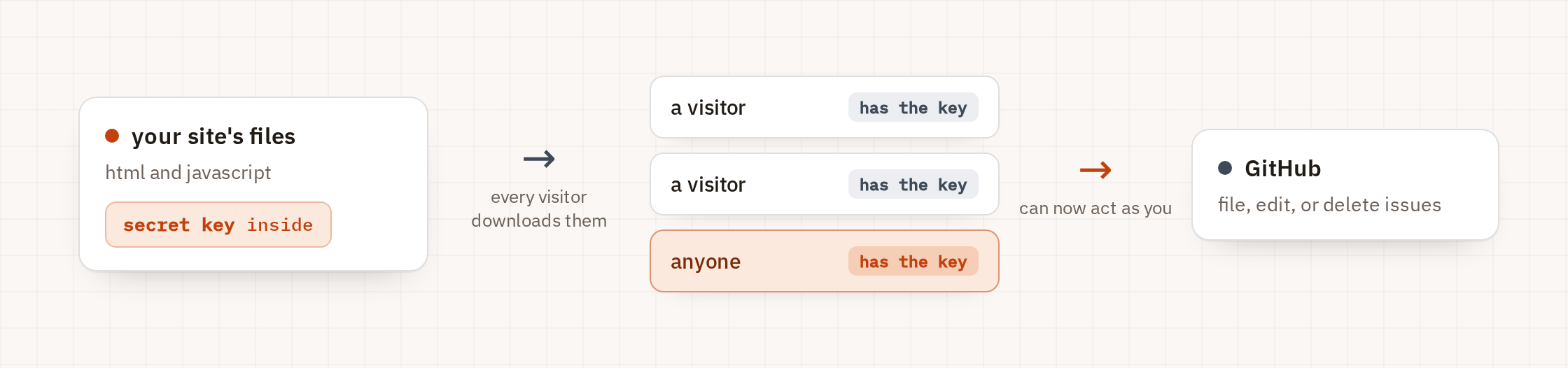
The secret key has to live somewhere the public can’t access it, which is why having a server is so useful for stuff like this. But that means making another account and probably another forever subscription and that’s not worth the trouble for something a Google Form would solve.
But Google Forms are ugly as shit and I immediately lose respect for any company that makes me fill one out.
Instead of a Google Form, I decided to use an Apps Script inside a Google Sheet. An Apps Script is a small scripting tool built into Google Sheets and Docs that can be published as a web address that runs your code when someone visits it. It can also store secrets and keys and call other services while also remaining private.
It’s also free for cases like mine where you’re unlikely to get more than 1-5 requests or submissions a week, at most.
So I ended up using an Apps Script in a Google Sheet, which is usually for writing a custom formula in a spreadsheet, as a small backend for the archive site. The user never sees the key and the key never leaves Google and the static site stays dumb and cheap. The reports never get written to a sheet. They go straight to GitHub.
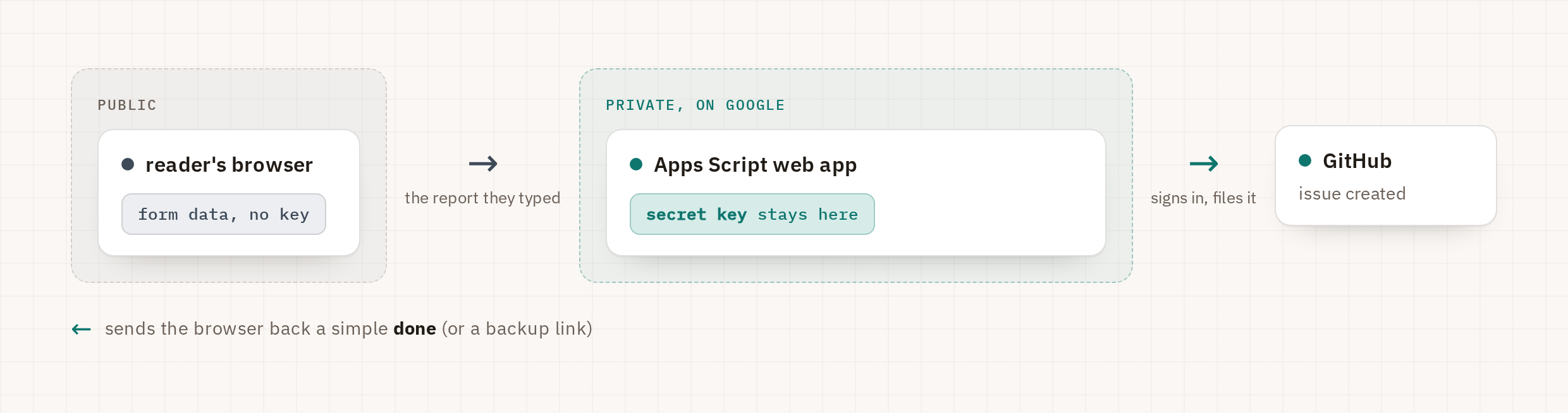
Technically, the Google Sheet doesn’t even need to have any data in it. The Apps Script just has to live inside a Google file.
A few important guardrails for public buttons
This is also lets anyone on the Internet post GitHub issues under your account so you definitely need a few basic defenses in place. I recommend the following three guardrails at the very least:
A honeypot field: A form field that’s hidden from humans with CSS but visible to bots. Real people won’t see it so they would never fill it in but a bot running a headless browser will just fill all the fields it finds. If that field has anything in it when the form is submitted, the script doesn’t run.
A daily cap or rate-limiting. The script keeps a running count and refuses to file more than a set number of issues per day (mine is 50). If someone or something finds a way to abuse the form the script just stops working.
A duplicate guard. Each submission carries a one-time ID. If a flaky connection makes the form retry, the script recognizes the repeat and files one issue, not five.
Is this even allowed? Yes. I checked.
It’s not a loophole. Every piece of this is a documented, supported use of each tool:
Publishing an Apps Script as a web app that anyone can call is what the web app feature is for. Google’s own docs describe receiving external POST requests as the intended use.
Storing credentials in Script Properties is common and fine. Google’s own example for Script Properties is storing a username and password for an external service and there’s no rule against holding a third-party key there.
A GitHub App creating issues through the API is a supported and recommended use case. GitHub calls Apps the preferred way to automate, precisely because you can scope them to narrow permissions and short-lived tokens.
A few things to watch out for
Free usage limits. A consumer Google account gets a daily budget of outbound calls (in the tens of thousands per day) and a cap on how long any single run can take. For a report button, you’ll never come close. For something high-volume, use a Google Workspace account (higher limits) or a real backend.
GitHub caps content creation at a few hundred new items per hour per app. That’s another reason the daily cap and honeypot matter: they keep you well under it.
Reader input becomes issue content. If your repository is public, everything a reader types is public and searchable, maybe permanently. Don’t collect personal information you wouldn’t post publicly, and make it clear on the form if you do. If you need privacy, use a private repository.
The stored key is visible to anyone you give edit access to the script. It’s hidden from readers and browsers, but not from your collaborators. Keep the editor list short, and know how to rotate the key (regenerate it in the GitHub App settings, reconvert, repaste) if it ever leaks.
I just thought it was neat and super useful for something that needs a secret key to run code that does one simple thing while Google foots the bill. I kinda wanna see how many of these I can chain together before something breaks.
The code for Jay Rosen’s Digital Archive is open source. If you want to start from my exact setup, the code is in this poorly named public GitHub repository.